A puzzlescript file is divided into 8 sections:
Objects can be placed on different layers:
================
COLLISIONLAYERS
================
Background
Target
Player, Wall, Crate
By placing objects in different layers, two (or more) objects can exist in the same cell, without one overwriting or removing the other.
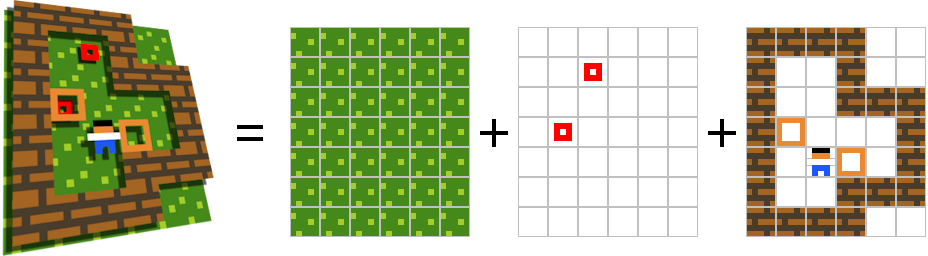
The main purpose of layers is in resolving movements: if one object is trying to move onto a space occupied by another object in the same layer, its movement is blocked unless that object is going to move away from it (i.e. it also has a movement on it right now and there's somewhere for it to go to that's not blocked).
Two objects from the same layer cannot coexist on the same cell (e.g. in the above set-up, if you create a Player where a Crate was before, the latter will be removed).
The order of layers also determines in what order things are drawn - from back to front.
The background layer is a special layer, consisting of a single 'Background' object (or property). Every game must have one.
Every cell must contain some object from the background layer.
By defining
Background = Background1 or Background2in the legend, you can have several possible background objects.
If a background object isn't present in a cell for whatever reason, it is inferred based on what other background objects are used in the level it's in (e.g. if the level only uses Grass as its background, a cell lacking a background will have Grass added to it automatically).
 PuzzleScript